A complete guide and prompt playbook for creating complex, scroll-driven websites.
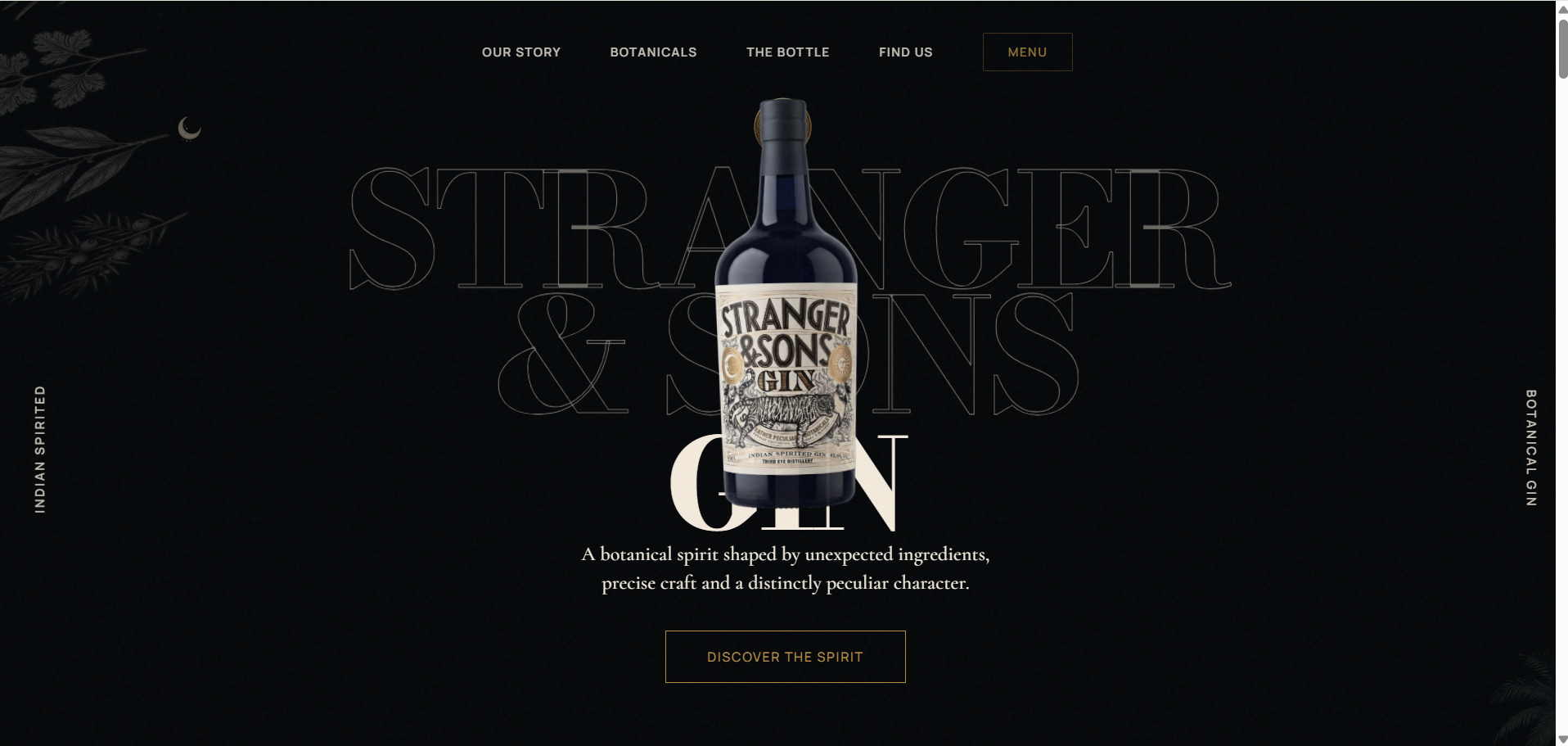
Building a complex website like the Stranger & Sons clone isn’t about giving the AI one massive prompt. If you ask an AI to “build an animated gin website,” it will fail and give you a generic, disjointed mess.
The secret is Architecture First, Animation Last. You must guide the AI to build the foundational structure, place the elements, and only then weave the complex animations through it.
Here is the step-by-step prompt playbook to recreate this masterpiece.
Phase 1: Project Setup & Architecture
Goal: Initialize the framework without any design elements yet.
TIP
Always specify your tech stack clearly in the very first prompt.
Prompt 1:
“I want to build a high-end, editorial-style website using Next.js (App Router), TypeScript, and CSS Modules. Do not use Tailwind. Initialize the project structure. Create a
components/layoutfolder for the Header and Footer, and acomponents/sectionsfolder where we will eventually put the page sections. Keep thepage.tsxclean and just render a basic Header, a<main>tag, and a Footer.”
Phase 2: The Design System (Globals)
Goal: Establish the exact color palette, typography, and grain overlay.
Prompt 2:
“Let’s set up the global design system in
globals.css. I need a premium dark aesthetic.
- Set CSS variables for a color palette: Ivory (
#F2E9DC), Black (#040608), Antique Gold (#B58C47), and Muted Ink (#48413C).- The body background should be Black, and the default text should be Ivory.
- Add a CSS-only film grain overlay using an SVG turbulence filter fixed to the screen with a low opacity and mix-blend-mode screen.
- Ensure
overflow-x: hiddenis set so animations don’t cause horizontal scrolling.”
Phase 3: The Persistent Stage (The Secret Sauce)
Goal: Create the fixed bottle layer. This is the most critical architectural decision. The bottle doesn’t exist inside the sections; it exists in a fixed layer above the sections.
IMPORTANT
If you tell the AI to put the bottle inside the Hero Section, you will never be able to animate it smoothly down the page. It must be in a fixed overlay.
Prompt 3:
“We are going to have a product bottle that stays on the screen while the user scrolls down the page. Create a
ProductStagecomponent. It should be aposition: fixedorposition: absolutefull-screen overlay withpointer-events: noneand a high z-index. Inside it, create abottleWrapperdiv. Inside the wrapper, I need 4 image layers absolutely positioned on top of each other: Front, Angle-Left, Angle-Right, and Back. The Front layer should haveopacity: 1by default, and the restopacity: 0. We will animate this later using GSAP.”
Phase 4: Building the Static Sections
Goal: Build the individual content blocks (Hero, Story, CTA) as if they were completely normal, static website sections.
Prompt 4 (Example for Hero):
“Now let’s build the
HeroSectioncomponent. It should take up at least100vh. Use a large, elegant serif font for a massive background text that says ‘STRANGER & SONS’. Below that, add some editorial paragraph text and a ‘Discover’ button. Center everything. Leave a blank space in the exact center of the screen where we expect our fixed bottle to sit.”
(You repeat this style of prompt for every section: The Goa Story, Botanicals, Label Craft, etc., ensuring you instruct the AI to leave empty space wherever the bottle will eventually travel.)
Buy Source Code: Click Here
Phase 5: The Master Orchestrator (GSAP)
Goal: Connect the scroll position to the bottle’s movement.
CAUTION
Do not let the AI use ScrollTrigger inside the individual section components. All animations must be controlled from one master component so they perfectly hand off to each other.
Prompt 5:
“Now let’s animate the bottle as the user scrolls. We will use GSAP and ScrollTrigger. Create a
ScrollManagercomponent that wraps theProductStageand all the sections inpage.tsx.Inside
ScrollManager, write auseGSAPhook with a master timeline (scrub: true).
- When the
HeroSectionis scrolling, the bottle should be atscale: 1andx: 0.- When the
PeculiarSectionscrolls into view, animate the#bottle-wrapperto move right (x: 24vw), scale down, and rotate slightly.- When the
BotanicalsSectionscrolls into view, crossfade the bottle images: animate#bottle-frontopacity to 0, and#bottle-angle-leftopacity to 1. Use.to()tweens for the opacity crossfades, do not use.fromTo()to avoid initial state conflicts.”
You Can Check Here: https://stranger-sons-8gjp19c5m-mariya-team.vercel.app/
Phase 6: Mobile Responsiveness
Goal: Adjust the complex timeline for small screens.
Prompt 6:
“The website looks great on desktop, but the GSAP timeline breaks on mobile because the screen is too narrow for the bottle to move 24vw to the right. In
ScrollManager, usegsap.matchMedia()to create a completely separate timeline for(max-width: 768px). In the mobile timeline, the bottle should mostly stay centered (x: 0vw) and simply scale up and down slightly as it moves between sections. Also, go into the.module.cssfiles for the sections and ensure the text is pushed down (margin-top: 50vh) so it doesn’t overlap the centered bottle.”
Summary of the AI Workflow Rulebook
If you want to build more sites like this with AI, follow these absolute rules:
- Rule of Separation: HTML structure first, CSS design second, GSAP animations last.
- The “Fixed Stage” Concept: If an object traverses multiple sections, it belongs in a fixed overlay, not in the DOM of the sections themselves.
- Master Timeline: Centralize all ScrollTriggers into a single
ScrollManagercomponent so the AI doesn’t create conflicting animations. - Iterative Fixing: When something breaks (like the double bottle glitch), specifically point the AI to the GSAP properties (e.g., “Check the
immediateRenderstates on your.fromToopacity tweens”).
The Secret to Prompting for this Website
The biggest mistake people make is asking an AI to “build an animated website” in one go. The AI will get confused and try to put the animations inside the individual sections, causing them to clip and break when you scroll.
As outlined in the guide, the “proper prompts” force the AI to do it in phases:
- The Architecture First: Prompt the AI to build a
position: fixedfull-screen overlay for the bottle (theProductStage) first. - The Dummy Sections: Prompt the AI to build the text and layouts normally, leaving empty space in the middle for the bottle.
- The Master Orchestrator: Tell the AI to use GSAP
ScrollTriggerin a single master component that ties the scroll position to the coordinates of the fixed bottle.
If you follow the prompts in the guide exactly in that order, you can rebuild this exact website (or create a completely new one for a different product) flawlessly using AI!